

Refresh
Drop in the exports you already run. A mapping engine reads your column names, not ours, and records every upload in a ledger you can roll back.
Procurement Control Tower
One live view of stock cover, demand, open orders and supplier delivery — built on the exports your ERP already produces.
The problem
Stock on hand, open purchase orders, confirmed sales demand, goods receipts, consumption history. Every number needed to decide what to buy is in the system somewhere.
Stock in one tab, open orders in another, sales orders in a third, lead-time assumptions in somebody’s head. The merge is manual, it is error-prone, and it is redone from scratch every week.
The order gets raised. Three months later nobody can reconstruct why that quantity, from that supplier, on that date — because the reasoning only ever existed in a meeting.
How it works
No connector to install, no middleware, no IT project. The loop runs on files your team can export today.
Drop in the exports you already run. A mapping engine reads your column names, not ours, and records every upload in a ledger you can roll back.
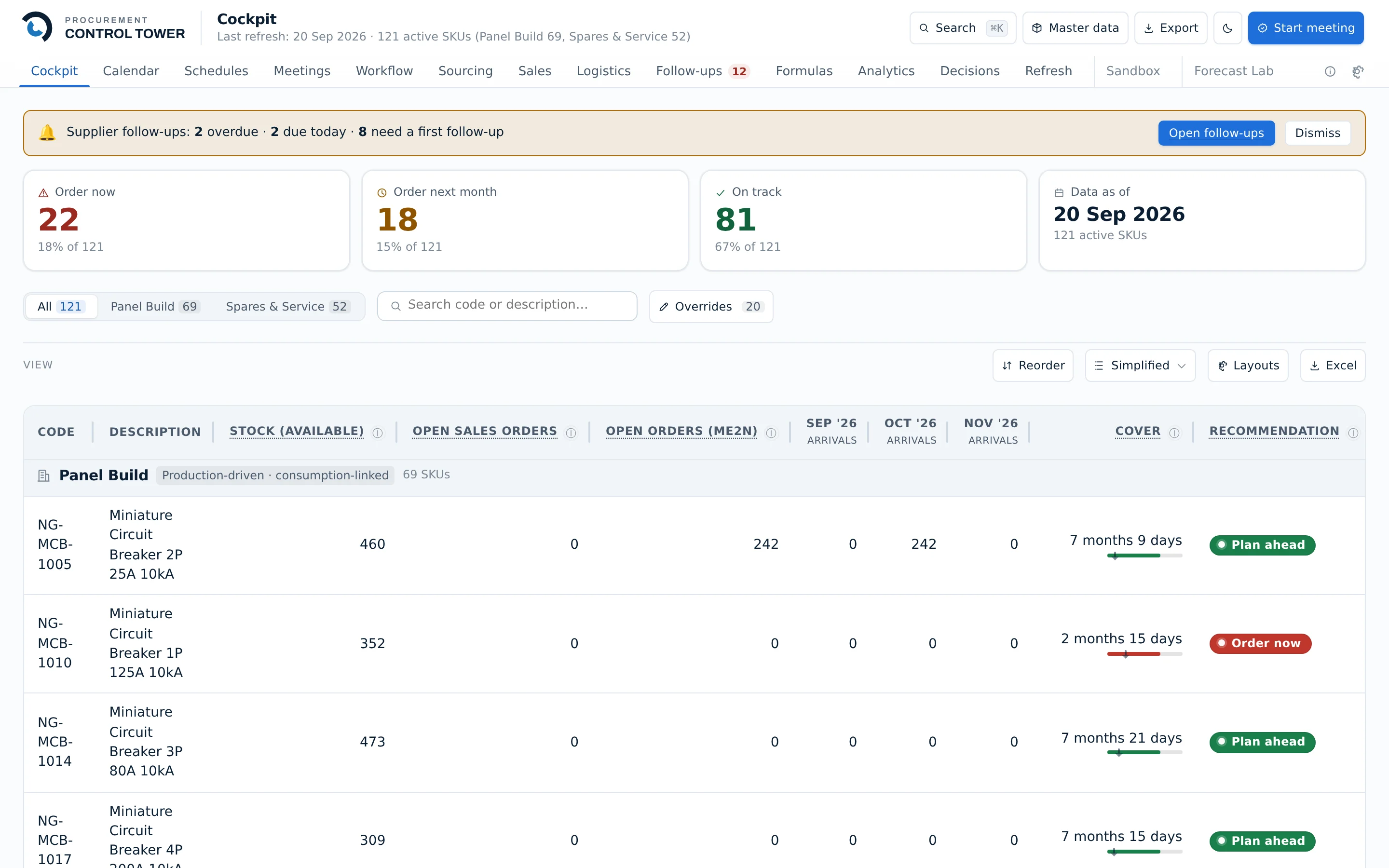
Every item in one table: stock available, open sales demand, open purchase orders, arrivals month by month, and months of cover.
Order now, order next month, or on track — computed from your own lead times, safety stock and service levels, with the formula shown rather than hidden.
Run the review inside the app. Actions, owners and outcomes are captured as an audit trail instead of evaporating when the meeting ends.
Coverage
Seventeen screens, grouped into the five questions a procurement team actually has to answer.
What will we need, and when do we run out?
Who supplies it, at what price, approved by whom?
Where is it, what did it cost to land, and who was late?
What did we promise customers, and at what price?
Who decided what, on what evidence?
Works with your ERP
Your ERP stays the system of record. This is the system of decision. Nothing is written back, no connector is installed, no ERP project is opened.
| Aspect | A typical control tower | Procurement Control Tower |
|---|---|---|
| Connection to the ERP | A live connector or middleware layer | Files you already export |
| Who has to be involved | IT, your ERP partner, extra licences | The procurement team, alone |
| Write access to the ERP | Often required | None. Ever. |
| Risk to the system of record | Real, and permanent | None — it cannot reach it |
| Time to a useful screen | Weeks of onboarding | One upload |
If it disappeared tomorrow, your ERP would not notice.
Built to be trusted
Not a prototype that grew. The guarantees below are enforced by the release process, not by good intentions.
100%
Separation between companies is enforced by the database itself and audited automatically. If a single table regresses, the deploy is blocked before it reaches anyone.
600+
Every screen, on desktop and on a phone, plus the calculations behind them. The deploy script refuses to run if one of them fails.
Daily
A complete copy of production taken daily onto separate infrastructure, with a restore path that has been rehearsed rather than assumed.
Several companies use it every week, each seeing only their own data. If you have an account, your workspace is one click away.
Sign in